
Office Timeline
Office Timeline is a PowerPoint add-in that enables users to quickly create professional project timelines, Gantt charts, and roadmaps.
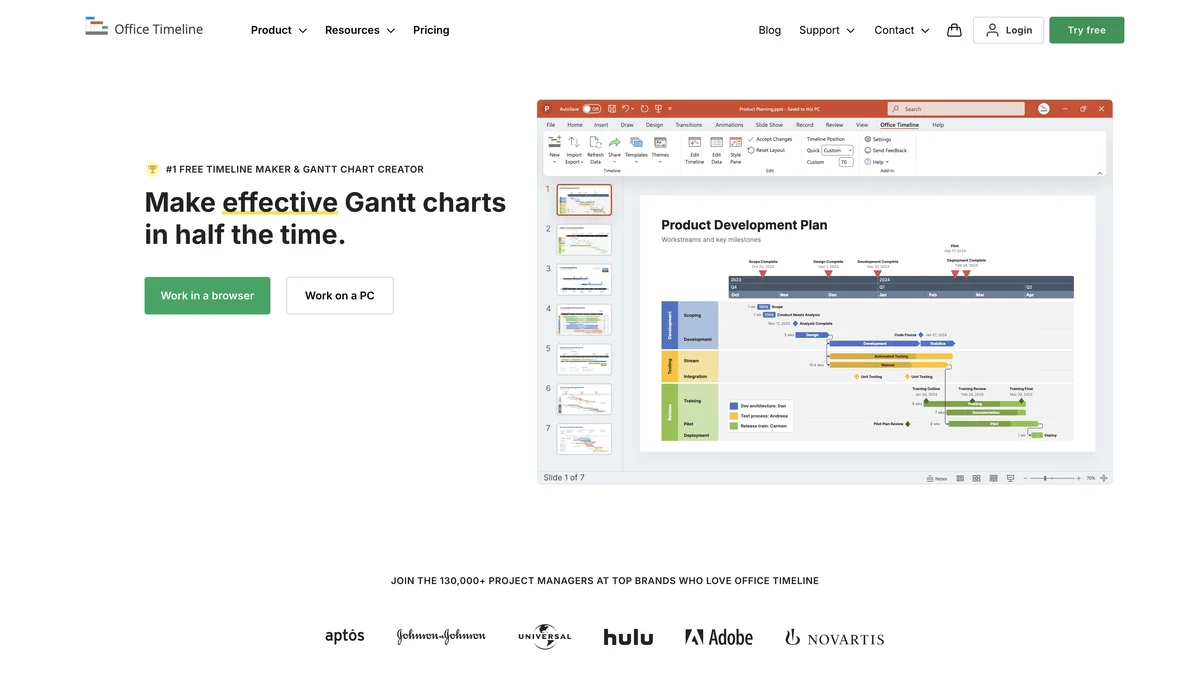
About Office Timeline
Office Timeline is a specialized project management add-in designed to integrate directly within Microsoft PowerPoint. It allows consultants, PMOs, and project teams to rapidly generate high-quality, visual project schedules, Gantt charts, and strategic roadmaps. This tool is optimized for producing clear visuals necessary for client updates, executive reporting, and internal project tracking. By streamlining the creation of complex project visuals, it saves significant time compared to manual PowerPoint design.
Key Features
PowerPoint Integration
Office Timeline functions as a native add-in for Microsoft PowerPoint, allowing users to build and edit project visuals directly within their familiar presentation environment.
Timeline and Gantt Chart Creation
The tool specializes in rapidly generating professional-looking project timelines, Gantt charts, and roadmaps using familiar Excel data.
Automatic Visual Updates
Any changes made to the underlying data in Excel are automatically reflected in the PowerPoint slide, ensuring visual consistency and saving manual update time.
Customizable Visual Styles
Users can easily adjust colors, fonts, date formats, and layouts to match corporate branding or specific presentation requirements without complex graphic design skills.
Data Import Flexibility
It supports importing project data directly from Excel, enabling quick population of complex schedules and milestones.
Use Cases
Project Planning and Kickoffs
Use Office Timeline to create clear, high-level project roadmaps to present to stakeholders during project initiation meetings, ensuring everyone understands the key phases and milestones.
Program Management Reporting
Program managers can quickly generate updated Gantt charts to include in weekly or monthly status reports, providing a visual summary of progress against the baseline schedule.
Portfolio Review Presentations
Executives and steering committees can review the status of multiple projects simultaneously using consolidated timeline views built with this tool.
Resource Allocation Visualization
By mapping tasks against timeframes, teams can visualize resource demands over the project lifecycle to identify potential bottlenecks or over-allocations.
Client Status Updates
Presenting complex project schedules to external clients becomes straightforward with polished, easy-to-digest timeline visuals that clearly show what has been accomplished and what is coming next.
Frequently Asked Questions
Is Office Timeline compatible with older versions of PowerPoint?
Office Timeline supports recent versions of Microsoft PowerPoint, typically requiring a modern installation of the Office suite for full functionality.
Can I use Office Timeline without Microsoft Excel?
While the primary method for data input is via Excel, the tool is designed to work in conjunction with Excel data to populate the visuals efficiently.
Is there a free trial available for Office Timeline?
Yes, the vendor typically offers a free trial period, allowing potential users to test the full features before committing to a purchase.
Can the generated timelines be exported outside of PowerPoint?
While the primary output is a PowerPoint object, the resulting visuals can often be exported or copied into other documents or formats supported by PowerPoint.
Does this tool support agile project management views?
While it excels at traditional Gantt and linear timelines, it can be configured to represent agile phases and sprints effectively through careful data structuring.